Back to Curated Plugins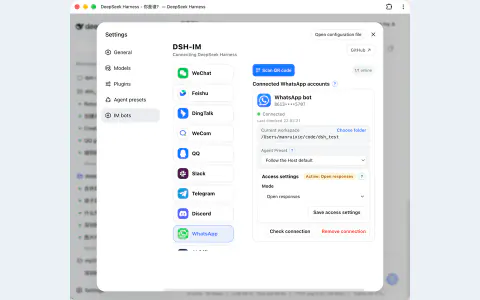
#3035 · Plugin
DSH IM
Connect messaging apps to your local Harness so you can send tasks, follow progress, and receive replies from your existing chats.
By xmanrui
View and installWhat it brings to your workflow
Explore tools for Collaborate and notify and bring the parts you need into your Harness workflow.
- Management UI
- Navigation
Set up your plugin
- A supported messaging account or bot application and a configured DSH model provider are required.
Try it in your workflow
- Open Settings → IM bots, choose a channel, and follow its QR-code or bot-credential setup.
About this project
Created for the DeepSeek Harness community. The original project has the latest documentation, license, and release details.